


SSL Certificates Fast
Starting price from trusted Certificate Authorities
Try risk-free with a 30-day money-back guarantee
Filter by brand or certificate type to find the right SSL for your needs.
Understand each certificate type before you buy.

Domain Validation SSL certificates are the quickest and most affordable way to secure your website. Issued in minutes — just verify domain ownership and your padlock is live.
DV SSL is ideal for blogs, personal websites, small business sites, and any site not transmitting sensitive financial or personal information. Activates the browser padlock and enables HTTPS.
View DV SSL Plans
OV SSL verifies your company's identity alongside domain ownership. Visitors can confirm they're dealing with a legitimate registered business — not just a domain holder.
Activates the browser padlock, displays your corporate identity in the certificate details, and gives your website a meaningful trust upgrade over basic DV SSL.
View OV SSL PlansEV SSL is the highest class of SSL — the most thorough CA vetting process, verifying your organization's legal, physical, and operational existence.
Displays your company name in the browser address bar. The standard for banking, ecommerce, and enterprise sites where maximum visitor trust is required.
View EV SSL PlansWildcard SSL covers your primary domain and all its subdomains (*.yourdomain.com) with a single certificate. Secure blog., shop., mail., and any future subdomains without buying separate certificates.
Available as DV and OV Wildcard. A cost-effective choice for anyone managing multiple subdomains on the same domain.
View Wildcard SSL PlansMulti-Domain SSL (SAN or UCC certificates) secures multiple different domains under a single certificate — up to 250 Subject Alternative Names per certificate.
Ideal for organizations managing multiple websites, Microsoft Exchange servers, and unified communications platforms. One CSR, one verification, one certificate.
View Multi-Domain SSL PlansCode Signing certificates allow software developers to digitally sign applications, scripts, and executables. Users can verify the code came directly from you and hasn't been tampered with.
Without Code Signing, Windows and macOS show "Unknown Publisher" warnings that reduce trust and downloads. A Code Signing SSL from OBHost eliminates these warnings permanently.
View Code Signing SSL PlansSet up your Managed SSL Certificate with just one simple step
01. After purchasing Managed SSL, submit a request with the domain you wish to associate it with. Follow the link in your email or contact our support team to get started.
That's it — our team handles the rest. That's the "managed" in Managed SSL.
A step-by-step guide to installing your SSL Certificate
01. Request the SSL Certificate: Specify your domain name and the type of web server hosting your site.
02. Verify your SSL Certificate: Confirm that you control the domain associated with the SSL Certificate.
03. Download and install: Download your primary and intermediate certificates from the SSL dashboard.
04. Redirect HTTP to HTTPS: After installation, direct all visitors to the HTTPS version of your site.
05. Verify installation: Enter your URL in a browser and look for the padlock — if visible, installation is complete.
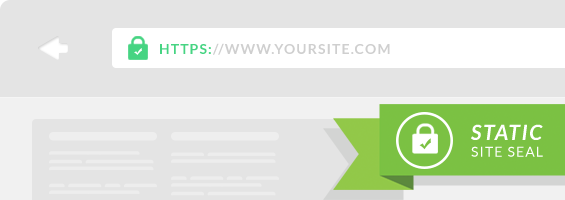
Issued in minutes — ideal for blogs, social media & personal websites
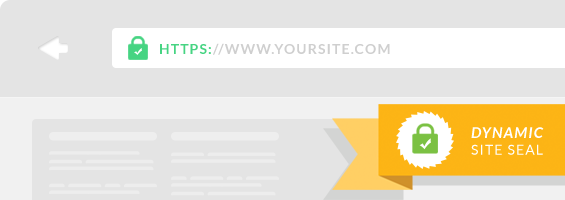
Company identity included in certificate — ideal for business websites
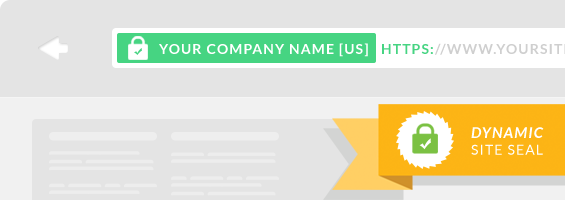
Green address bar & company name displayed — ideal for ecommerce
Every website needs SSL — here's exactly what you gain when you secure your site with OBHost SSL.

SSL encrypts all data exchanged between visitors and your web server. Every packet transferred — passwords, payment details, form submissions — is protected from interception by third parties.

Visitors feel safer on SSL-secured websites. A visible padlock signals your site is legitimate and customer data is protected — increasing both trust and conversion rates.

Google has confirmed HTTPS as a ranking signal. Installing SSL can positively impact your search engine rankings and drive more organic traffic to your site.

Higher SEO rankings bring more visitors. More visitors on a trusted, secure site means more conversions, more leads, and more revenue for your business.

Without SSL, modern browsers flag your site as "Not Secure" in the address bar — immediately undermining visitor confidence. SSL removes this warning entirely.

The padlock and "https://" in your URL assure visitors that your site is verified and encrypted — the visible sign of a secure, trustworthy website.
HTTPS (HyperText Transfer Protocol Secure) is the secure version of HTTP — the protocol that governs how data moves between your browser and a web server. The "S" confirms that an SSL/TLS certificate is protecting the connection.
SSL (Secure Sockets Layer) — now technically TLS (Transport Layer Security) — is the cryptographic layer responsible for encrypting data in transit. When a visitor connects to your site, SSL/TLS performs a handshake to establish an encrypted session, ensuring data exchanged cannot be read by third parties.
OBHost offers SSL certificates from globally trusted Certificate Authorities — Sectigo, RapidSSL, Thawte, DigiCert, and GeoTrust — available from $3.60/yr with instant issuance for DV certificates.
Without an SSL certificate, modern browsers (Chrome, Firefox, Safari, Edge) display a prominent "Not Secure" warning in the address bar. For visitors, this is an immediate red flag — many will leave your site before reading a single word.
An SSL certificate eliminates this warning, replaces it with a padlock, and shows visitors that their connection is encrypted. It also signals to search engines that your site is legitimate — contributing to better rankings, more traffic, and ultimately more sales.
Everything about OBHost SSL certificates — types, issuance, installation, and trust levels.
Get SSL Now →Sectigo · RapidSSL · Thawte · DigiCert · GeoTrust · DV · OV · EV · Wildcard · Multi-Domain
Free installation support · 200,000+ Customers · Since 2014 · 30-day money-back